 TestDisk
TestDisk
Re-chart disks after partition tables vanish, flicker as RAW, or refuse to boot—without paying for shrink-wrapped installers.
Maintained by CGSecurity under the GPL, TestDisk ships as a terse terminal workflow that labs and power users have leaned on for years.
Fetch TestDisk archiveWhy volunteers still mention TestDisk
TestDisk is no-cost software released under the GPL by Christophe Grenier’s CGSecurity effort. Its charter is to put missing partitions back on the map and hand you a bootable path again after malware trips, cloning mishaps, or the dreaded “oops, I wiped the table.”
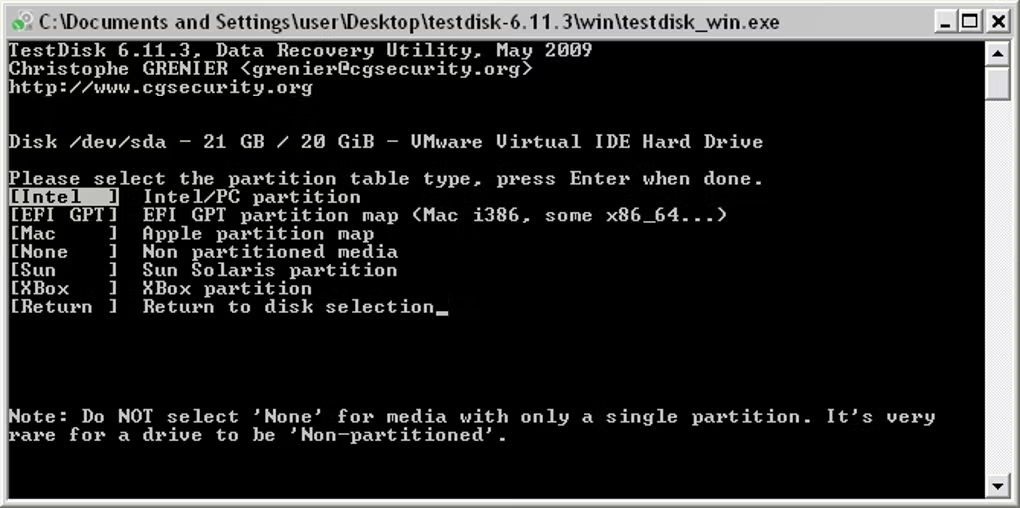
Instead of glossy animations you get menus that stay close to the metal: pick the physical disk, hint at Intel/GPT/Mac schemes, then let TestDisk sweep for ghosts of old boundaries before anything gets rewritten.
Use it when indexes, FAT32/NTFS boot straps, or partition descriptors need surgery. When the filesystem narrative is gone and you only have entropy to dig through, pivot to PhotoRec for signature-style carving.
Signals people cite before launching it
GPL economics
No coupon codes or tiered licenses—inspect the source, rebuild if paranoid, redistribute under the same rules.
Bench lore
Bench technicians still tuck it beside imaging docks because it quietly survived forum scrutiny.
Thumb-drive friendly
Unpack the archive, launch from WinPE or Linux live sessions, keep writes aimed away from the sick disk.
Logical triage
Prioritizes partition descriptors and boot straps before you chase scattered clusters manually.
Interface stills
Thumb through captured frames of TestDisk’s terminal UI; tap the hero tile for a dimmed fullscreen pass.
Capability shortcuts
Partition map surgery
Rewrite corrupted descriptors so vanished slices mount cleanly inside your OS.
Open deep dive →Boot strap rebuilding
Lean on FAT and NTFS repair paths plus mirrored backups when the OEM mirrored them.
Open deep dive →Metadata-aware undelete
Pull FAT/exFAT/NTFS/ext entries back while directory records still breathe.
Open deep dive →Where teams deploy it first
- 1 A rushed Diskpart clean leaves slices invisible—TestDisk walks the platter hunting prior cylinder hints.
- 2 Dual-boot laptops refuse POST because EFI entries drift—boot strap routines buy time before reinstalling OS images.
- 3 Clone jobs mis-align offsets yet directories still mount intermittently—logical fixes beat wholesale imaging.
- 4 SOC analysts image laptops then hand disks to specialists who need CLI transparency inside sterile VMs.
- 5 Crypto-mining malware overwrote only partition metadata—carving would waste weeks when tables still recoverable.
Choosing the right sibling tool
TestDisk shines whenever logical scaffolding still matters: partition vectors, boot loaders, directory indexes. Expect terse TUIs and deliberate keystrokes rather than ribbon bars.
Retail suites often blend GUIs, automated marketing copy, and carve-by-magic modes. TestDisk deliberately skips MIME sniffing—reach for PhotoRec when filenames evaporated but magnetic remnants remain.
Rule of thumb: structure-first emergencies → TestDisk; shredded catalogs → PhotoRec; polished wizard cravings → budget commercial suites.
Sister utility spotlight
PhotoRec
PhotoRec stays laser-focused on rescuing individual blobs—RAW frames, Office docs, ZIP bundles—when directories no longer map to clusters. It rides alongside TestDisk inside CGSecurity’s toolbox yet answers a totally different pager.
Signature hunting
- • Streams sectors linearly hunting magic bytes tied to known formats
- • Renames outputs generically yet preserves binary fidelity
- • Keeps working after quick formats hollow out FAT/MFT pointers
- • Accepts custom extensions via curated signature lists
Contrast with TestDisk
Keep TestDisk on deck when partition arithmetic still saves hours. Swap to PhotoRec once mount points evaporate and lawyers only care about file bodies, not volume labels.
Comfort paths
Purists stay inside ncurses flows; everyone else can launch QPhotoRec for mouse-kind interactions.
Transparency we repeat on purpose
GPL v2-or-later licensing means you can diff every syscall-level decision, compile yourself, or mirror tarballs after verifying hashes.
There is no ribbon UI; Plan ahead with logs, disk picks, geometry guesses, then deliberate writes.
Mirror downloads only from cgsecurity.org or distro maintainers you trust. Miracles aren’t sold here—physics still governs overwritten sectors.
Read safety policies →Still planning your workflow?
Fetch binaries from CGSecurity, compare checksums, clone disks when budgets allow, and halt casual writes on compromised media.
Jump to download checklist