 TestDisk
TestDisk operator playbook
Keyboard-first sequences for spinning up TestDisk, proving disk identity, walking Analyze, and parking rescued payloads somewhere sane.
Expect a TTY-native workflow: arrows, Enter, occasional letter shortcuts—no ribbon bars or drag-and-drop disk charts.
Cold launch checklist
Unpack archives onto media that is not the sick spindle. On Windows invoke testdisk_win.exe; on UNIX-like shells run testdisk (often with elevated privileges when touching system disks).
Session logging
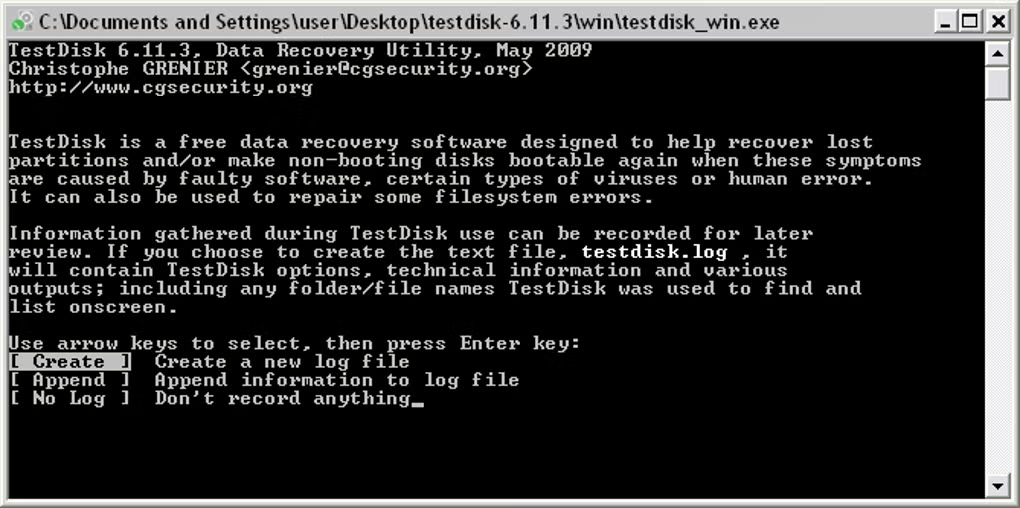
Accept Create when prompted—logs capture geometry guesses, writes declined, and timestamps your decisions if something escalates to support forums.
Prove which platter you touched
Cross-reference capacity strings with Disk Management, lsblk, or vendor stickers. Mis-clicks rewrite strangers’ weddings. Keep staging volumes disconnected until you are deliberate.
Declare the partition grammar
Intel/EFI GPT/Mac schemas matter—accept auto guesses only when they align with how the machine shipped. Forcing the wrong grammar yields imaginary slices.
Hunting vanished layouts
Inside Analyze you’ll bounce between:
- Quick Search — cheap geometry sniffing for classic PC partitions.
- Deeper Search — slower sweep that peeks at FAT/NTFS/ext backup metadata hiding near cylinder edges.
Preview files inside candidates before letting TestDisk rewrite partition tables—typing errors become permanent fast.
Sanity-check recovered slices
List folders while still inside TestDisk whenever the filesystem cooperates; mismatched labels beat guessing from cylinder math alone.
Advanced pulls & undeletes
Advanced → Undelete/list paths grab metadata-backed files. Always aim exports at different iron—never loop recovered TIFFs back onto the donor disk.
Stage recovered payloads
Pick roomy NTFS/APFS/ext destinations, spot-check checksums on a handful of files, then clone again—single copies are not a backup.
Symptom cheat sheet
Firmware loops before OS logo
Boot WinPE/Linux sticks, aim TestDisk at the internal NVMe/SATA target, rebuild partition visibility first, then revisit boot strap rebuild helpers—still from offline media.
Volumes vanished from Explorer
Chain Quick → Deeper searches, mark plausible boundaries, postpone OS-side formatting until TestDisk commits or you’ve cloned sectors.
OS offers “Format disk?”
Treat that modal like poison—pivot to boot sector/MFT/FAT rebuild menus inside TestDisk before letting Explorer initialize anything.
Table writes didn’t mount cleanly
Reboot or rescan buses; if mounts stay sour, harvest files via Advanced copies or escalate to filesystem-specific repairs.
Identical capacities everywhere
Power down extras, label enclosures with tape, snapshot serials—paranoia beats forensic invoices.
Operator habits
- Never stage restores onto the bleeding disk.
- Re-read the highlighted row before every destructive keystroke.
- Mirror anything precious immediately after rescue.
- Pair curiosity with logs so rollback notes exist.
Snippet locker
TestDisk ignores Registry fluff—it speaks directly to partition descriptors and boot straps. Copy/paste-friendly reminders live below.
# Linux / macOS (may require sudo for system disks)
testdisk

# Windows: run from the folder where you extracted TestDisk (e.g. testdisk-7.2.win)
testdisk_win.exe# Windows (PowerShell or Command Prompt)
certutil -hashfile testdisk-7.2.win.zip SHA256
# Linux / macOS
sha256sum testdisk-7.2.linux.tar.bz2
# or
shasum -a 256 testdisk-7.2.mac.zip# Match disk size and model to TestDisk's list
lsblk -o NAME,SIZE,MODEL
# or
fdisk -lFirst-time jitters
Pause on each cyan prompt—nothing auto-advances. Logs plus wiki screenshots beat frantic tapping. Still foggy? Step through CGSecurity’s wiki side-by-side.
When carving beats geometry
If catalogs evaporated after destructive formats, lean on signature scanning instead of forcing partition fantasies.
Sibling scanner
PhotoRec
PhotoRec walks platters linearly, reviving JPEG/ZIP/DOC ghosts without trusting directories. Pair CLI stoicism with QPhotoRec when mice feel mandatory.
Stay inside TestDisk when partitions merely blink offline—jump to PhotoRec once inode trails dissolve.
Pull PhotoRec / QPhotoRec